
You are using an out of date browser. It may not display this or other websites correctly.
You should upgrade or use an alternative browser.
You should upgrade or use an alternative browser.
Is anyone running ONE on Windows 11 at this point?
- Thread starter Steve G
- Start date


Steve G
Active member
If you are talking version 2.068, I tried it the day after it was released and no luck. I reached to them and asked if they might be addressing the issue of ONE not running on the new Mac in parallels and all they keep saying is "We don't support that"!@Steve G There was a new update to ONE just recently. Did that fix the issue with the M1 Mac? Do you use Parallels?
I wish I had better feedback - that is all I got!
Hi Steve. Have you had any luck using windows 10 instead? or any other workaround you know of?If you are talking version 2.068, I tried it the day after it was released and no luck. I reached to them and asked if they might be addressing the issue of ONE not running on the new Mac in parallels and all they keep saying is "We don't support that"!
I wish I had better feedback - that is all I got!
Steve G
Active member
I continue to experiment with this, and I am running the latest Beta of ONE on a Windows 11 laptop PC just fine and then I remote desktop into that PC from my M1 Mac, and that continues to work just fine - but so far, no luck getting that same latest version to run on an M1 Mac running parallels and Windows 10 OR Windows 11 on an M1 Mac.Hi Steve. Have you had any luck using windows 10 instead? or any other workaround you know of?
The ONLY little bit of "sunshine" in this scenario is that I was able to get the older (original or stable) version of ONE to run on my M1 Mac in Windows 11, and it seemed to work fine, but of course, it does not have all of the features of the Beta version.
It was not a straightforward install and I had to jump through some hoops trying to get it to load in Windows 11 and I don't recall the exact path I used, but there is a way to attempt to open a program in Windows 11 using different ways of opening it, and I played with it until it opened. It has now saved that opening method and will open OK each time.
All that said - ONE says you could encounter issues going back and forth from the Beta version to the Stable version. I did not have issues the one time I flopped back and forth for testing - but just wanted to share that comment from them.
Thanks Steve. I was thinking about the Remote Desktop solution as well. Not the best solution but glad that is working.I continue to experiment with this, and I am running the latest Beta of ONE on a Windows 11 laptop PC just fine and then I remote desktop into that PC from my M1 Mac, and that continues to work just fine - but so far, no luck getting that same latest version to run on an M1 Mac running parallels and Windows 10 OR Windows 11 on an M1 Mac.
The ONLY little bit of "sunshine" in this scenario is that I was able to get the older (original or stable) version of ONE to run on my M1 Mac in Windows 11, and it seemed to work fine, but of course, it does not have all of the features of the Beta version.
It was not a straightforward install and I had to jump through some hoops trying to get it to load in Windows 11 and I don't recall the exact path I used, but there is a way to attempt to open a program in Windows 11 using different ways of opening it, and I played with it until it opened. It has now saved that opening method and will open OK each time.
All that said - ONE says you could encounter issues going back and forth from the Beta version to the Stable version. I did not have issues the one time I flopped back and forth for testing - but just wanted to share that comment from them.
Actually just thought of something... what about running windows in the cloud? I think Microsoft has this available for a monthly fee? Wonder if it would be just like running your own computer with whatever windows apps you install but just running it from a web browser? Anyone try this?
Steve G
Active member
Yes - remote desktop works really well when the PC and Mac are in the same network and it is easy to set up - but when I am on the road, Remote Desktopping in to the PC is a little slower and clunkier. Still works - but not ideal.Actually just thought of something... what about running windows in the cloud? I think Microsoft has this available for a monthly fee? Wonder if it would be just like running your own computer with whatever windows apps you install but just running it from a web browser? Anyone try this?

I have a virtual windows workstation setup for a contractor with Amazon Workspaces.Actually just thought of something... what about running windows in the cloud? I think Microsoft has this available for a monthly fee? Wonder if it would be just like running your own computer with whatever windows apps you install but just running it from a web browser? Anyone try this?
https://aws.amazon.com/workspaces/
Not as good as a computer at your desk but it's available if you travel and overcomes the Mac processor/ONE issue.
Windows machines (and laptops) are really cheap. Check out the Dell Refurbished computers:
https://www.dellrefurbished.com/desktop-computers
I'm sure facebook marketplace and ebay have similarly cheap Windows PCs. The ONE computer requirements are pretty minimal:
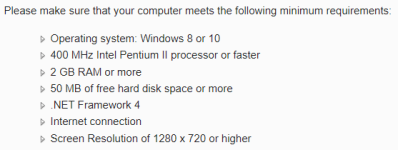
https://www.dellrefurbished.com/desktop-computers
I'm sure facebook marketplace and ebay have similarly cheap Windows PCs. The ONE computer requirements are pretty minimal:
Steve G
Active member
My understanding is still NO based on people I know that have recently asked. At one point (with some extra work at adjusting settings), I was able to get smaller version to work - but since I had multiple position opens, it would crash all the time. I have been using OptionTradersAssistant since Nov. 22 and have been very happy with it for the most part - but it does not have the historical data/backtesting functions of ONE, but is then better in some other areas. If you want to give it a free 30 try - you can use this link: https://aeromir.com/otaGood Morning everybody,
is ONE still not running on a M1 Mac with Parallels?
Thanks
Bernhard
Last edited by a moderator:


DaveN
Member
Hi All, I know we covered this in another thread, but I'm repeating this here to follow up on Remote Desktop as a solution:
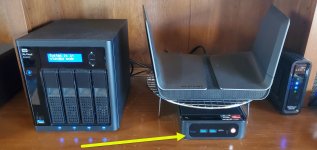
I bought a mini PC from Amazon (Beelink SER5) which is often on sale ($459 right now, I grabbed it for $409 earlier), and this is but one example. It has 32Gb of RAM, a Ryzen 7 8-core processor, 500 Gb of SSD storage, and Win11 Pro, so plenty of resources. It's about 5" square and sits on my shelf behind my desk, right under my router. The only connections I've made to it are a power cable and network cable, no monitor or keyboard necessary.
An added benefit here is that when connected directly to the router instead of using WiFi, the connection is almost 10x faster.
I remote into it everyday and display the desktop on my 32" monitor. It's fast, easy, and remotely accessible. I run ThinkOrSwim, IBKR TWS, ONE, Excel and my API programs all in one place. It has plenty of resources, and backtesting in ONE is quite fast. Email, Zoom, Teams, web browsing, etc. is all done on my local machine so I don't compete for resources with my trading software. Sharing my remote window is easy on Zoom or in other presentations.
I've even remoted in a few times from my tablet, while away from home, to make adjustments to some of my positions. Usually I'll use my laptop, and always through a VPN set up through my router.
I bought a mini PC from Amazon (Beelink SER5) which is often on sale ($459 right now, I grabbed it for $409 earlier), and this is but one example. It has 32Gb of RAM, a Ryzen 7 8-core processor, 500 Gb of SSD storage, and Win11 Pro, so plenty of resources. It's about 5" square and sits on my shelf behind my desk, right under my router. The only connections I've made to it are a power cable and network cable, no monitor or keyboard necessary.
An added benefit here is that when connected directly to the router instead of using WiFi, the connection is almost 10x faster.
I remote into it everyday and display the desktop on my 32" monitor. It's fast, easy, and remotely accessible. I run ThinkOrSwim, IBKR TWS, ONE, Excel and my API programs all in one place. It has plenty of resources, and backtesting in ONE is quite fast. Email, Zoom, Teams, web browsing, etc. is all done on my local machine so I don't compete for resources with my trading software. Sharing my remote window is easy on Zoom or in other presentations.
I've even remoted in a few times from my tablet, while away from home, to make adjustments to some of my positions. Usually I'll use my laptop, and always through a VPN set up through my router.
Attachments
Steve what will ONE run on? I have two Macs. Please advise.It runs perfectly fine on Windows 11 - Just not Windows 11 running on a new M1 Mac - then it won't run at all.