Butterfly Pricing spreadsheet

gariki

Member
Hello Folks,

I've recently posted a fly pricing spreadsheet on my site (a glorified blog of sort). Given a number of folk here trade similar structures (flies, condors etc) thought it would benefit you folk as well.

I am attaching the spreadsheet here to the post so you dont need to go to my website (but if you happen to.. do let me know if you have any comments :)).
https://siramcapital.com/free-tools/

___

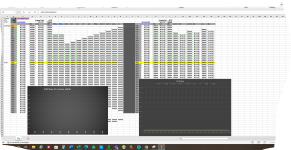
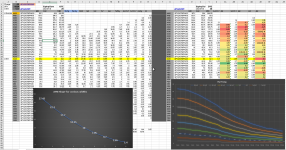
The left side of the spreadsheet is setup to show direct fly pricing across strikes and widths, and the right side shows the delta in price between various flies at different strikes – for a given width fly.

It uses data from ToS using Excel RTD link (so you will need your tos client open for data to flow through). Only cell that might need updating based on when you download the file is cell “C1”, where it needs any opra-code for the series you are interested in (it can be copy/pasted from tos).

screenshot for reference:
1624031402078.png

Happy Trading!
-gariki
 

Attachments

Gariki, that is quite interesting. I love building tools that make trading easier. They are fistmost huge time savers. For example they can show you the state of the markets in a single glance or lay out various trade options for you eliminating manual chains scanning.

I can't test your tool but looking at pic have a questions about the right side.
What is it that you display on the graph?
How do you use 'diff' column in trading? What info does 'diff' col provide that is missing from the left side?
What are the rules for (and meanings) of colors in diff columns?

I was on you website (you 'stole' navbar's color from me ;) - joking of course) but haven't time to read posts. Will soon. Thanks for sharing. I'm interested in any apps of this kind if you have more to show :D
 
I had an issue with the xlfn in column c and v so I deleted that and also spelled out concatenate and it worked after that
Probably because I have an older version of excel
Not sure I will using it to trade butterflies but maybe I can use it for something else but looks interesting
 
This is a little off subject but is there a reason why there are no images/graphs on the blogs on your website ?
 
@Marcas: Idea of the diff column is to see the difference in pricing between a fly centered at x vs at x-10 or x+10. Many times i dont mind a fly around in a wide range of center strikes and if there are any price abnormalities due to skew or whatever they should become evident in pricing and should show up in the price of the fly directly.

As for the coloring, its the default coloring excel provided if you want to color a range - darker the green the bigger the positive change. So if you see a 1$ price difference if you go say 20ponts down, vs at a strike that had a 20c diff from the above strike - then perhaps you want to go that 20 points down. There could be something there (i am saying could because often times the difference is just because of the spreads and it will quickly converge).

And you are right; that data is available in the data on the left - but you will have to substract for each step of the fly.

@status1: Good to know that you fixed the problem status1.

For the blog images comment; i wonder if you are looking at the main blog page where only a summary blurb is shown - but once you click on that the entire post shows up; most of the articles have atleast a couple of pics so - wondering.
 
Thanks for explanation. As said I can't test it (no Excel) but have an idea what it does and how to use it (especially that I run similar ones ;) ).
Good job!
 
For the un-indoctrinated; a description of what the spreadsheet does would be helpful.
Thanks for the input Dave. I did include a brief description on the site as well as in the post above. But perhaps i will update the spreadsheet and add some description directly in it.
 
I am getting an oddball error just on one specific strike and only on the ask price

The value on TOS is correct but the RTD value that comes up is around .20 when and it bounces to other invalid numbers like 15 when it should be around 50 The other odd thing is that instead of showing 20 cents it shows a date 2021-06-28
The option strike in question is the .SPXW210628P4330
The cell is set to numbers so not sure why it's showing a date the RTD formula is correct and if I change the Put to Call in C1 the value shown is correct and I can also change the expiration to something else and it's also correct

So it's only for the 6/28 expiration only on the put side and only for the 4330 strike
 
Yes. I have seen odd stuff like that coming through the RTD feed once in a while. Closing and reopening the spreadsheet usually fixes it for me. Worth a try..
 
Yes. I have seen odd stuff like that coming through the RTD feed once in a while. Closing and reopening the spreadsheet usually fixes it for me. Worth a try.

I opened the spreadsheet. I got a message to enable editing which i did.

Then I changed C1 to .SPX220916P3930. this is what i am seeing. what am i doing wrong ?

1662119505699.png
 
I believe that it may be due to some incompatibility or excel version
If you click in cell cell C6 for example you see this =_xlfn.CONCAT($C$3,B6) The xlfn is not a word that excel understands and also the CONCAT should be fully spelled out
If you do a find _xlfn.CONCAT and replace with CONCATENATE it should work at least it worked for me
 
Agree with status1; seems like some software compatibility issue.

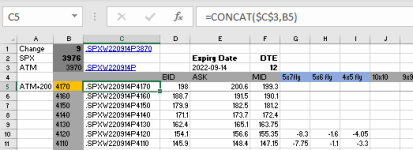
When i try today; and replace with a random SPX opra; this is what i see..
1662127506070.png

And data loads up fine. Dont see the _xlfn stuff. Are you on some kind of unix/apple hardware by any chance?

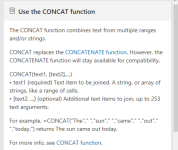
Also, negative on replacing with CONCATENATE. According to MSFT documentation.. its superseded by CONCAT (but if that works.. on your platform and your version of software then by all means).

1662127607302.png


Cheers!
-gariki
 
And data loads up fine. Dont see the _xlfn stuff. Are you on some kind of unix/apple hardware by any chance?
No I have excel 2010 which may explain the xlfn and the CONCAT not working
I have seen the xlfn issue before so I am familiar with it and I know it's because I don't have the latest excel version and I can deal with it
I imagine you have excel 365

I just got this from a search on the website
The generic meaning of xlfn is "unsupported function".
So the CONCAT is not supported on my version and that is why I am getting the XLFN
 
Yep; on office 365.

Was curious on this _xlfn thingy.. and you are bang on.

Here is what google says; interesting to know..

1662129680037.png
 
Last edited:
Top
Contact Us