Alternatives to ONE

It has some features that are better than ONE but I would not jump to the conclusion that it could replace ONE but that's just my opinion Also it's a bit more expensive

I assume it has no charting at least I did not see any
I did not see this in the video presentation but can you set up a trade in the past and mange the trade going forward like you can in ONE ?

You said in the video that if you import a trade you would not have the adjustments unless you do them live on the platform
So even if you import the adjutments you would not see it on the platform ?
I am not proposing totally dropping any other software right out of the gate, but just to consider what I am doing which is running this side by side with my current software (since it is a totally FREE trial) and see what you think.

At present, there is no charting but given it is browser-based, I just open another browser window beside or behind this tab with charts from a free source like trading view or similar.

Regarding importing - importing does log all of the adjustments into the trade, the program just does not automatically capture the before and after image of each adjustment like it does if you enter the trade/adjustment through the OTA.

I have imported opening trades along with a host of adjustments to trades that are still open and am now managing them through OTA directly.

You are correct in that right now, Charles does not have historical data that allows you to "Spin back" to a point in time and start paper trading going forward from that time. It is on his road map, but as we all know that historical data is very expensive.
 
Thanks Steve. What about the underlying Model? How does it compare to the other platforms?
I am not certain I understand the question. If the question is - does an open position in OTA mirror the general P&L and metrics of the same trade in other programs - YES, in my experience so far it does. The ONLY caveat I might add to that is that since other programs are not capturing the precise leg prices of a trade (unless you manually enter each one of those leg prices each time), you can have slight variations as OTA is working with the EXACT pricing on each leg.
 
I thought this platform was free.. I guess it is for 30-days but the paid plans are about the same price as OptionVue. (Brian will negotiate). It's nice to see a new alternative but I'll have to see if it's worth changing platforms.

I suspect that thinkorswim is enough for me these days.
 
I thought this platform was free.. I guess it is for 30-days but the paid plans are about the same price as OptionVue. (Brian will negotiate). It's nice to see a new alternative but I'll have to see if it's worth changing platforms.

I suspect that thinkorswim is enough for me these days.
It is a free 30-day trial to check it out, and then a fee comparable to the other platforms. I think the KEYS for me are:

1) It connects directly to the broker, so no manual entry or copy/paste
2) It is platform agnostic and works on my Mac, Tablet and Phone
3) As an educator - I can lay out a trade plan in advance, including adjustments and be notified when those adjustment points hit
4) The developer is very responsive to suggestions (Optionvue may be as well, but my experience with ONE has not been so good)

There are a number of other "plusses" that I am personally finding, but I think those are the big ones to me.
 
It is a free 30-day trial to check it out, and then a fee comparable to the other platforms. I think the KEYS for me are:

1) It connects directly to the broker, so no manual entry or copy/paste
2) It is platform agnostic and works on my Mac, Tablet and Phone
3) As an educator - I can lay out a trade plan in advance, including adjustments and be notified when those adjustment points hit
4) The developer is very responsive to suggestions (Optionvue may be as well, but my experience with ONE has not been so good)

There are a number of other "plusses" that I am personally finding, but I think those are the big ones to me.
Just an FYI on WHY it is important to make sure you have your actual Leg Fills in your software:
SJG: Make sure you are aware of THIS:
 
Yes chuck, there are lots of features I did not show, but they are shown in the video and YES, you can go out in time and/or modify IV to see changes in the T0 line as shown in the image below - I don't think it currently has multiple T0 lines, but he is pretty responsive to requests - so we can toss that one at him.


View attachment 4399
thanks for sharing. this looks really good, however... its not open to non US Brokers yet. Hope they consider IBKR soon.
 
Just an FYI on WHY it is important to make sure you have your actual Leg Fills in your software:
SJG: Make sure you are aware of THIS:
@Steve G you nailed it with that one! Yes, it's housekeeping that I have to do in ONE after each trade and adjustment. It can get busy when I have a number of different trades on. Also, it can be a bit of math when my fill occurs in several pieces before it's finished.

You make a great point in the video about carrying part of your combo into another trade, and the importance of having the fill pricing corrected.

I've often wondered about the Greeks with these pricing differences too. Overall, the Greeks on a Butterfly or other Combo position will be the summation of each of the legs, and those calculation differences will work out in the totals. But if you move just a part of the combo and carry that into another trade, those Greeks will be different in that next trade.

I wish that ONE would pull in my fill prices so I didn't have to correct them on every leg of every trade. Also, while pulling those, it could get the actual commission and fees instead of the overall estimate used for the account in ONE. We all deal with fees being slightly higher on the Sell To Close rather than Buy To Open, but especially the large fee differences between say SPX and RUT option trades. I keep separate accounts for each in ONE.
 
SteveG, thanks a lot for making this presentation about new software for trading options. It looks good (with caveats).
I’m interested in this kind of stuff...

Few comments after watching the presentation:

Firstly: great coding work. It takes efforts to put such a piece of code together. Really nice job.
Ability to connect to brokers is a very nice feature. I assume all security measures are taken.
Wonder how the process of establishing broker-OTA looks like. Don’t know about TastyTrades but for TDA, to my knowledge, it’s a real pitb. For what I've heard about IB... I want to see it. If IB happens OTA will be a hit!

No surprise one has to pay for that job. Is the price right? Maybe. Maybe some broker will buy it out and traders can enjoy OTA for the cost of commissions...

Considering this trio: OV, ONE, OTA, if I had to choose, it likely be OTA (for what I’ve seen and I have my own historical data).

but

I’m interested in trading mostly, so all educational centered features, journaling, etc, do not appeal to me much.
Trading related features, although better than in other two, are not that impressive.
Sure there are improvements, I’d say even important ones, allowing a trader to create better workflow, but, imo, it’s not enough (I talk price, and this is a discretionary opinion). Some things could have been done better (maybe they are and I just don’t know about them yet) some are completely missing (same caveat).

Trade suggestions is a nice feature but it is for novice traders mostly (imo). I assume methodology (algo) used to suggest some trades over others is a black box – not good. It can work very well but I doubt that traders with experience will be using it even if it's good.

Do you know if OTA has an API that allow third parties to write extensions? That would be GREAT.

I suppose that OTA will became quite popular. It contains improvements over ONE and OV that may add real value for some traders. Other may still prefer time proved codes of ONE or OV, especially that within the price they also include historical data.
To be clear: I use neither and have no sentiment toward any of them (I had in the past but it’s gone). As Tom I use my codes, tailored to my trading style and liking, along with TOS’ platform. Probably not as nice as having everything under one name but it works.

Again, I’m impressed by how nicely OTA is put together. I understand that it's still under heavy development and we can expect more in the future.
As is (by your presentation only) I guess this soft will be mostly appealing to novice traders, especially in a teacher-student relation.

You are an experienced trader. I’m curios of your, and other seasoned traders’, opinion after using OTA for few month in real trading.

Again, thanks for interesting presentation.
 
No problem Amy - any time. The option Dave suggested above for $230 seems like a great one in my mind.
Amy, this is exactly the way I use ONE and I can highly recommend it.

I have ONE running under Windows 10 on an Intel NUC PC (very similar to the PC Dave suggested) - its on a shelf with no monitor/keyboard etc. At home I access it on my main PC with large monitors (using Windows remote desktop).

If I'm away I remote desktop to it using the Google Remote Desktop plugin. It was super easy to set up and I can now access ONE from absolutely anywhere (via any Chrome browser). I can easily access it from my MacBook and I often access it from my phone - which is extremely handy!!
 
Great news for everyone who is using Mac with Apple silicon. ONE version 2.0.71 Beta 32bit is now compatible with Windows 11 running in Parallels VM.
Few things to note:
  1. Make sure you download latest 32bit version of ONE
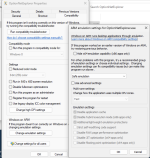
  2. If you see an Error message after you start ONE. Try to change emulation settings:
    1. Right click on ONE exe file. Mine is located at "C:\Program Files (x86)\OptionNET\OptionNetExplorer.exe".
    2. Click Properties
    3. Click Compatibility tab
    4. Click Change emulation settings
    5. Select "Safe emulation".
    6. Click "Ok"
  3. If you still see an error message, try to right click on executable -> properties -> Compatibility, click "Run Compatibility Troubleshooter".
 

Attachments

  • Screenshot 2023-01-12 at 22.20.27.png
    Screenshot 2023-01-12 at 22.20.27.png
    757.8 KB · Views: 6
Great news for everyone who is using Mac with Apple silicon. ONE version 2.0.71 Beta 32bit is now compatible with Windows 11 running in Parallels VM.
Few things to note:
  1. Make sure you download latest 32bit version of ONE
  2. If you see an Error message after you start ONE. Try to change emulation settings:
    1. Right click on ONE exe file. Mine is located at "C:\Program Files (x86)\OptionNET\OptionNetExplorer.exe".
    2. Click Properties
    3. Click Compatibility tab
    4. Click Change emulation settings
    5. Select "Safe emulation".
    6. Click "Ok"
  3. If you still see an error message, try to right click on executable -> properties -> Compatibility, click "Run Compatibility Troubleshooter".
Z - how many trades do you have open at a time and do you find that ONE crashes or stalls if you have more than 5-6 open at a time?
I had previously been able to run the 32 bit version on windows 11, but I often have 15+ trades open across 3 accounts and the 32 bit could not handle it at the time - so IF you have any feedback on that - please advise. THANK YOU!
 
Z - how many trades do you have open at a time and do you find that ONE crashes or stalls if you have more than 5-6 open at a time?
I had previously been able to run the 32 bit version on windows 11, but I often have 15+ trades open across 3 accounts and the 32 bit could not handle it at the time - so IF you have any feedback on that - please advise. THANK YOU!
Steve, I rarely have more than 1 trade at a time. I've been using this version only for a few days. It crashed once, wasn't critical for me.
 
Steve, I rarely have more than 1 trade at a time. I've been using this version only for a few days. It crashed once, wasn't critical for me.
Thank you - the 32 bit version seemed to be OK for me up to about 5 trades as I recall, then it started to choke and I had to go to the 64 bit (which does not work on M1 mac at this time).
 
I typically have about 55 trades on at any given time. About 20 of those positions are covered calls which do not require much management. Most of the others are 4 legged positions, some are more complex and 8 legged. It crashes maybe once every 3 weeks, but luckily all the prior entries are retained, and i have never had to re-enter a trade, in the last year that I have been using ONE.

The only complaint i have is, if i enter a lot of trades and dont close the program, if i open ONE on a different computer, then the trades entered on the other computer will not be there.
 
I typically have about 55 trades on at any given time. About 20 of those positions are covered calls which do not require much management. Most of the others are 4 legged positions, some are more complex and 8 legged. It crashes maybe once every 3 weeks, but luckily all the prior entries are retained, and i have never had to re-enter a trade, in the last year that I have been using ONE.

The only complaint i have is, if i enter a lot of trades and dont close the program, if i open ONE on a different computer, then the trades entered on the other computer will not be there.
Srk, for clarification, are you doing this on the 32 bit version of the program or the 64-bit version? I am assuming the 64 bit version and probably on a PC as well, but if for some reason you are able to log that amount of trades on the 32 bit version on an M1 Mac in Parallels, I will start working on getting mine set up this weekend.
 
64-bit PC
Yes, I have pushed the 64-bit on a PC equally as hard, but unfortunately, the 64-bit version of the software does not yet run on an M1 Mac in Parallels, it seems only the 32-bit version does, and it chokes pretty rapidly.
 
@Steve G, Resources might be another thing to think about with all of the trades you are monitoring. Are you able to tinker with the config of Parallels?

@srk, wow, that's impressive! It takes concentration and solid skills to stay up with all of those trades at once. I image that's a fairly robust machine that you are monitoring all of that concurrent activity on each day. 64-bits certainly helps, but still....

As a general rule, but not always true, if something runs well enough on x, but not so much on 5x, I'd take a look at Memory and CPU. I'm not familiar with Parallels, but I imagine it's much like any other Virtual Machine and you allocate a certain amount of RAM as well as number of cores of CPU. Perhaps those can be bumped up? Graphics (GPU) as well, if you can.

If this is a physical Windows machine, the first thing I'd look at is installed memory and the CPU cores and clock speed. It has been years since I've run anything with less than 32Gb of RAM and high core-count CPU's. It makes for expensive laptops but well worth it over time. My trading machine is a physical tower with 64 Gb and an 8-core CPU clocking over 3GHz. 64-bits on everything running. It's rock solid and dedicated solely to running ToS, IBKR, API's for each, and ONE only during trading hours.

I expect that Parallels is configurable somehow, and it might be worth trying out.
 
@Steve G, Resources might be another thing to think about with all of the trades you are monitoring. Are you able to tinker with the config of Parallels?

@srk, wow, that's impressive! It takes concentration and solid skills to stay up with all of those trades at once. I image that's a fairly robust machine that you are monitoring all of that concurrent activity on each day. 64-bits certainly helps, but still....

As a general rule, but not always true, if something runs well enough on x, but not so much on 5x, I'd take a look at Memory and CPU. I'm not familiar with Parallels, but I imagine it's much like any other Virtual Machine and you allocate a certain amount of RAM as well as number of cores of CPU. Perhaps those can be bumped up? Graphics (GPU) as well, if you can.

If this is a physical Windows machine, the first thing I'd look at is installed memory and the CPU cores and clock speed. It has been years since I've run anything with less than 32Gb of RAM and high core-count CPU's. It makes for expensive laptops but well worth it over time. My trading machine is a physical tower with 64 Gb and an 8-core CPU clocking over 3GHz. 64-bits on everything running. It's rock solid and dedicated solely to running ToS, IBKR, API's for each, and ONE only during trading hours.

I expect that Parallels is configurable somehow, and it might be worth trying out.
Thanks so much Dave and you obviously know your way around the workings of computers WAY MORE than I do. I do know that Parrallels is configurable, while I understand what you are seeing, prior to going to the mac, I used a PC with 32 gb of Ram and decent processor and still found ONE to choke when I had 5+ trades going on it and their support said I just needed to switch to the 64 bit version - so I did.

IF you or anyone else is running ONE's 32 bit beta and able to monitor a lot of trades on it - please let me know and I will give it another shot for sure. Unfortunately, their support team is lacking (in my opinion), and all I get back when I ask questions like the above is a bit of a snippy response that does not tell me much, so I have given up on that approach for now.
 
Top
Contact Us