Alternatives to ONE

It still not working for me When I close a trade it just disappears no matter the closing price looking on the left side of the trades tab it says Closed trades 0 and under it No closed trades

Also I can't do anything with the journal It doesn't even show the trade as soon as I click on import from thinkorswim it shows that message
Perhaps you can place an example trade that works for you on the journal
I pasted this in the journal and it's not working for me BUY +100 AAPL @348.00 LMT
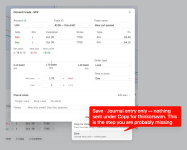
 
Thanks for the details. In the Commit dialog, "Copy for thinkorswim" only copies the order; nothing is recorded until you open the small arrow next to it and click Save. After that the trade is open, "Close at…" appears, and saving the close moves it under Closed. The × on a draft card deletes the draft, so the trade vanished and never showed up as closed. The Journal's paste takes filled orders copied from thinkorswim's Filled Orders (BOT/SOLD lines); order lines like BUY +100 AAPL @348.00 LMT go into Trades → New → Paste from thinkorswim instead.

A draft row in the sidebar shows an × on hover. it discards the draft.
My best guess is that your trades were never recorded. They are still drafts, and the thing you call “close” deletes the draft
you probably read the × as “close this trade”. Correct me if i am wrong.
The Journal never lists drafts, which is why you can’t see the trade there either.

1792583354251.png
 
Ok I got it working now I did not know I had to save the trades

Is the +ADD in the journal used for anything ?

In the performance it looks like all the trades are combined into one Is it possible to keep them separate by symbols ?
 
Ok I got it working now I did not know I had to save the trades

Is the +ADD in the journal used for anything ?

In the performance it looks like all the trades are combined into one Is it possible to keep them separate by symbols ?
Glad it works. +Add records trades you didn't build in Trades: "Record a combo" for any trade by its total cost, "Paste from thinkorswim" for fills copied from Filled Orders, and imports from TWS or OptionNET Explorer. The first two are greyed out until you pick an account in the Account filter next to it (not "All accounts"). Performance has a "By underlying" table further down the page that splits P&L by symbol. The curve and the totals at the top still combine everything, and a symbol filter for those is a good idea; I'll look into it.
 
Top
Contact Us