

I've been talking with Bill Schamp at PricePhysics about NinjaTrader's CQG Web API.
Here is some information from Perplexity.ai about the CQG Web API:
The CQG Web API with a NinjaTrader Brokerage account offers several key advantages:
The service is typically free for non-professional traders with a NinjaTrader Brokerage account. It provides streaming Level 1 and Level 2 data without filtering, compression, or consolidation ( see CQG's information about their Web API )
Technical Capabilities
To use the CQG Web API with your Ninja Brokerage account, follow these steps:
STEP 1
In the process of improving the data flow we are told that switching to the CQG WebAPI should be a help for data consistency.
Contract NinjaTrader Support ([email protected]) or call at 1.800.496.1683 but that is a complete exercise in patience.
Request that they switch your login to use the more modern CQG WebAPI.
When contacting support, provide all of your current login and account number to speed up the process.
If you email support, you'll get an email from their AI saying "the WebAPI setting is no longer available for use...." Later in the email reply, it says:
This message was AI-generated. AI responses can contain inaccuracies. To speak with a live representative just reply Agent to this email.
REPLY TO THIS EMAIL and it will create a ticket that a human will review!
STEP 2
After NinjaTrader Support has updated your account in their database:
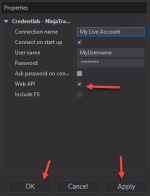
- Go to "Connections" -> "Configure"
- Add a new connection called "My NinjaTrader Continuum"
- Rename it to something you can recognize
- Check the Web API checkbox
- Click Apply and then OK
Here is some information from Perplexity.ai about the CQG Web API:
The CQG Web API with a NinjaTrader Brokerage account offers several key advantages:
The service is typically free for non-professional traders with a NinjaTrader Brokerage account. It provides streaming Level 1 and Level 2 data without filtering, compression, or consolidation ( see CQG's information about their Web API )
Technical Capabilities
- Access to high-quality historical data including tick, intraday bar, and daily bar data
- Average latency of 7 milliseconds for market data transmission
- Secure WebSocket technology using OpenSSL for data delivery
- Unified exchange gateways for order execution and account management
- Access to multiple global exchanges and markets
- Advanced order routing capabilities and real-time market data integration
To use the CQG Web API with your Ninja Brokerage account, follow these steps:
STEP 1
In the process of improving the data flow we are told that switching to the CQG WebAPI should be a help for data consistency.
Contract NinjaTrader Support ([email protected]) or call at 1.800.496.1683 but that is a complete exercise in patience.
Request that they switch your login to use the more modern CQG WebAPI.
When contacting support, provide all of your current login and account number to speed up the process.
If you email support, you'll get an email from their AI saying "the WebAPI setting is no longer available for use...." Later in the email reply, it says:
This message was AI-generated. AI responses can contain inaccuracies. To speak with a live representative just reply Agent to this email.
REPLY TO THIS EMAIL and it will create a ticket that a human will review!
STEP 2
After NinjaTrader Support has updated your account in their database:
- Go to "Connections" -> "Configure"
- Add a new connection called "My NinjaTrader Continuum"
- Rename it to something you can recognize
- Check the Web API checkbox
- Click Apply and then OK
Last edited: