Just saw this link

Nice! Thanks for the link and sharing, Gary! Calling a Python function from Excel that's written in the embedded notebook can really open things up.
 
The $29/month pricing is NUTS for a compiled DLL. You can compile a DLL to do the same integration.
Besides, there are better (easier and faster) ways of doing these things with Python native and Pandas.

More importantly, why bother with Excel? I touch Excel nowadays when I am forced or too lazy to do it with Python.

Why? The VBA for Office Apps is an awfully inconsistent, non-portable, and outdated collection of languages that are not actively developed or maintained by Microsoft. The many VBA languages are steadily being replaced by OfficeScript so Microsoft can keep expanding Office365 and Enterprise365? See this Microsoft article OfficeScript versus VBA Notice the placement of OfficeScript and PowerAutomate

PowerAutomate is also known as "PowerPickYourPocket" from the Azure Cloud. In the bigger picture, Azure and Enterprise365 (Microsoft), AWS, and GCP are striving to own all jobs related to IT and developer platforms, desktop OS, and cloud server so they capture the revenue, and then in the next outsourcing wave, outsource all good-paying jobs to low-paying countries.
 
Pretty good summary.
I don't track MS anymore but what you said lines up with past practices (I just hope that only in the parts you mentioned).

Excel was a thing, and still is in offices, where people are familiar with creating variety of spreadsheets.
Not VBA, just coloring cells and applying formulas.

"Why bother" is my pow as well although some may also ask "Why bother with Python when I have Excel?".
For simple tasks this is justified position. It would be unreasonable to learn Py or other computer lang, simply to display some data from options chains.

On the other hand on TG1 Tom shows his spreadsheets and they are pretty good imo, and do add practical value to trading. To my knowledge (I didn't open Excel for like 5+ years now), there is a point where Excel will not suffice.

On the other ( third ?) hand... I remember somebody even did simple backtester in Excel, so....

If Excel does what is expected - why not? It is a good start. Beside with Excel you have GUI part solved which is not a trivial task for Py starters (if one needs GUI). Expanding Excel with Py is a good idea - if everything works smoothly. This can be nice transition path.

For Py users 'Why bother" is a natural reaction though.
 
About those MS practices.
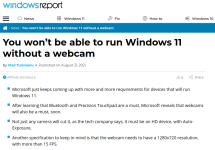
Just stepped upon a new thing coming to Win world (which is not new at all to the world).
Can anybody can come up with a single honest reason for that?

1669486008302.png
 
If one really likes Excel for stuff, but has no interest in VB, and wishes to do everything in Python.... There are free python packages that allow you to create and manage Excel either hidden or visible from Python. I am not currently using these, but if I ever have a need for Excel and drive from Python, it would be considered. "pywin32" seems to have useful capability for those on Windows machines.
 
I just "doodled" a bit with this and it seems to be functional.
Years ago, I coded with Perl, and used something similar there, which had lots of capability, that may also be avail here.
When using the Perl implementation, I was able to modify some of the VB structures to set the Refresh rate and other RTD functionality from Perl, so expect there is a way to have similar control with a python implementation. This snip of python was to create an Excel spreadsheet with a few RTD references.
 

Attachments

Top
Contact Us