I have had major performance issues off & on for the last 2 yrs with ThinkorSwim. Issues include super slow platform navigation, crashing and freezing. It also takes 5 minutes or so sometimes for the software to close & exit. The primary problem now is everything seems to be a delayed reaction with the interface..super, super slow....it takes several seconds for drop downs to appear or the risk graph to populate. Even typing in orders or anything at all is cumbersome. I got rid of any custom scripts a long time ago. I also do not have any special scans or similar going. That cured things for awhile but the "slow" issue is back with a vengeance. The strange thing to me is things will work fine for a few months and then it all goes to crap....of course, Tech Support claims it has nothing to do with the periodic updates causing the issues. Clearly, I am no tech wizard so I am looking for some trouble shooting strategies if anyone has any ideas.
A few other possible clues: (1) everything runs fine after mkt hrs so maybe it has something to do with how the platform handles the inbound data flow? (2) as the day progresses the platform gets increasingly slow (3) I have not changed my setup in any way - PC, wired internet connection, complex custom scripted charts or any add'l open windows/charts (4) it doesn't matter if i have 10 other programs running, internet browser with 25 open tabs, ONE open, Excel and Word open or just 1 instance of ToS...the performance is the same...uber-slow (5) running ToS using a very similar workspace runs perfectly fine on my laptop - same internet connection too.
Specs: Dell Inspiron 3847, Win 7 Home Premium 64-bit, ToS 64-bit version, 8GB RAM, Intel Core i-3-4130, 3.4 GHz, 5 Mbps max internet download speed, ping 47ms, jitter 8ms (i know that is super slow in today's world but it hasn't been an issue in the past with ToS, TradeStation, etc.)
I've gone through all of the std "solutions" offered up by ToS Support including:
* Uninstall / Re-install 64-bit version
* Delete GUI flie and restart platform - things are good for about 10min and then slow as molasses again
* Increased max perm size to 384 - to allow more video card memory ???
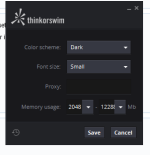
* Re-set RAM allocation setting to 512-2048 - i've used higher settings but it just eats up the extra available memory with no performance improvement
Any suggestions would be mucho appreciated!
A few other possible clues: (1) everything runs fine after mkt hrs so maybe it has something to do with how the platform handles the inbound data flow? (2) as the day progresses the platform gets increasingly slow (3) I have not changed my setup in any way - PC, wired internet connection, complex custom scripted charts or any add'l open windows/charts (4) it doesn't matter if i have 10 other programs running, internet browser with 25 open tabs, ONE open, Excel and Word open or just 1 instance of ToS...the performance is the same...uber-slow (5) running ToS using a very similar workspace runs perfectly fine on my laptop - same internet connection too.
Specs: Dell Inspiron 3847, Win 7 Home Premium 64-bit, ToS 64-bit version, 8GB RAM, Intel Core i-3-4130, 3.4 GHz, 5 Mbps max internet download speed, ping 47ms, jitter 8ms (i know that is super slow in today's world but it hasn't been an issue in the past with ToS, TradeStation, etc.)
I've gone through all of the std "solutions" offered up by ToS Support including:
* Uninstall / Re-install 64-bit version
* Delete GUI flie and restart platform - things are good for about 10min and then slow as molasses again
* Increased max perm size to 384 - to allow more video card memory ???
* Re-set RAM allocation setting to 512-2048 - i've used higher settings but it just eats up the extra available memory with no performance improvement
Any suggestions would be mucho appreciated!