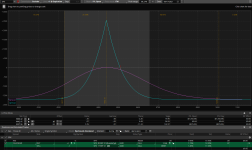
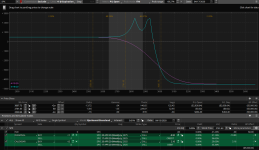
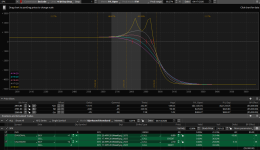
Oddball T+0 line and P/L behavior

Wow what are the odds that you captured the exact problem we have now

Can you do me quick favor ?
Could you try a simulated trade buy a 30 sep Quarterly and sell a Sep 17 weekly calendar and than close and open TOS and let me know if the Sep weekly has changed to the monthly or not

Td is trying to tell me there is something wrong with my platform because they can't duplicate the problem so I just wanted to verify that
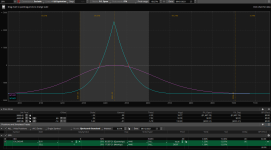
 
But there is more. Before closing TOS, I saved the initial one as a text file and it shows like this:

1628778532822.png

And now I saved what it became after reopening and it looks like this:

1628778610243.png

And even if I try to import the initial one, it comes as a 17 SEP AM.
 
Well it's a bug in TOS since you also have it I guess they are just to lazy to duplicate it or their system is somewhat different
I will try to reload TOS just to see what happens but I doubt it will fix it because it's just this particular combination
If I change the quarterly to something else it's not doing it
 
WHAT A MESS !!
I just compared SPXW Theta value of 4 different brokers(TOS,IB,C.SCHWAB,LIGHTSPEED): all different!!!! (some double!!!).

I'm using my custom made software...but what a group of MORONS!!!!!

"you pay peanuts you get monkeys!" Let me pay more ..but give me a real service!!!!!
 
This is for the problem with the 17 Sep weekly change
I was finally able to get TD to see the problem
"I've escalated this to our tech team for further review and troubleshooting, no ETA on this as we'll need to further investigate with other strikes and options symbols to come to a root cause, evaluate how to correct and will do so once we identify it
 
It doesn't hurt them to say they will address it. This morning after posting those screen shots for Status1, I started a chat session and complained again (the 3rd time) about the P/L not listening to Theta when you advance from current date. He initially said that when the trading day already started, that theta is only a partial value. I explained that it happens after hours as well and anyway if there is such thing as partial theta, no problem, but P/L should be higher or lower based on that partial value. He then said something similar, that the development team will look into it.
 
This problem with the theta not advancing as it should when advancing the date does not happen with ONE

I recently bought ONE and I tried the same trade and it does not have a problem with it like TOS does even though it uses TOS data feed
I guess they must be doing the modeling differently while using the same data
With ONE when I advance the date by one the p/l advances by the theta amount which would be normal but I guess TOS does not want to bother with fixing their model
 
ONE used the Black Sholes pricing model, but the TOS default model is the Bjerksund-Stensland. Not sure how much difference this make in the risk graph in either of these applications. To find this in TOS, do to the Analyze tab > Risk Profile tab, you can look under "Positions and Simulated Trades" and you'll see it next to "Model."
 
I looked at that but there is no difference between the two There is a small difference between those 2 and the Binomial model but not enough to make up the difference of the theta value
I think it may be something internal that affects all the models so I am sure it's not easy or convenient for them to go that deep to find the problem
 
Trying to comprehend what you are doing on TOS, when you "advance the date by one" on ONE and try to relate that somehow to TOS? -- With ONE, when you advance date, you are altering the data to that point in time. TOS has no such feature for intra day (only EOD via ThinkBack), definitely not with the Risk Graph. When you alter date in the Risk Profile, you are "projecting" time and assuming other factors are constant -- not the same thing! (note that ONE is using data at discrete points in time, whereas TOS is observing at that moment (which if after market closed, is garbage).
That may have an impact, but the fact is TOS didn't have this problem a while back. It was all fine at beginning of this year.
 
Looks like garyw removed the post but just to explain the situation for better understanding

When I say advance the date by one I am referring to the date on the analyze tab in TOS using the (+)
I am not referring to the think back
This happens all the time during trading hours
You set up a simulated trade and than note the value of Theta compared to the p/l and you will see that they do not advance at the same rate
This is most noticeable with calendars especially when combining a monthly with a weekly

In ONE I am using TOS data and set up the same trade and I am using the arrow on the top right above the risk graph to advance the date
and I see the Theta in sync with the p/l value

I am not sure what the problem is or how ONE does it but I don't see why TOS can't fix this problem

I just set up a trade in TOS for 19/21 jan 4725 with Theta at 1.2 and p/l at -.03 than advance the date by one and while the calendar is OTM and would loose some value when I advance it by one day the entire T+0 line goes below zero and now Theta is -0.18 but the p/l is -87.48 and that is just for 1 lot
The center of the calendar does not even begin to make money until 3 weeks later

I don't care how you look at it the T+0 line is messed up on calendars on TOS That's one of the reasons I am trying to use ONE because I can no longer rely on the p/l shown on TOS for calendars
 
Here is proof that TOS had it correct in the past.
This is a screen shot of a trade I was looking at back in Apr 2020. Theta = 229.
1640131643881.png

Then here is the same trade with day steps in one day increment. In order to see the expiration as well, I increased the current date by one day, so the purple line which was T+0 before is now equivalent to T+1 and you can see the corresponding P/L is 229, so it went up by an amount pretty much equal to Theta.

1640131671260.png

Try to do something similar in TOS today and it will be totally wrong for the 1st day.
 
Last edited:
Top
Contact Us