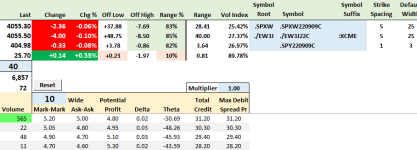
SKEW Driver Spreadsheet is Available

tom

Well-known member
Administrator
I created a stand alone SKEW Driver spreadsheet that is now available on the "Tips and Tricks" page.

https://my.aeromir.com/tips

The spreadsheet connects to thinkorswim for data.

The SKEW Driver looks for $5.00 SPX 20-wide Put spreads that are about 30 days-to-expiration.

If the reading is small (under 30?) then the market is likely over bought.

If the reading is large (over 100? 150?) then the market is likely over sold.

 
This is unrelated to the skewdriver but I just happened to download the put and call data and I just noticed something on the put page
There is a button called "Tony's Button" Is that used for anything or is just some leftover stuff ?
It just seems to take a blank cell and paste it into the C2 cell basically just deleting the number of contracts
The call page does not have that
 
Whi
This is unrelated to the skewdriver but I just happened to download the put and call data and I just noticed something on the put page
There is a button called "Tony's Button" Is that used for anything or is just some leftover stuff ?
It just seems to take a blank cell and paste it into the C2 cell basically just deleting the number of contracts
The call page does not have that

Which spreadsheet/tab are you looking at? I don't see a "Tony's Button"
 
I was looking at the put chain tab on the put and call data spreadsheet
Here is a screenshot of it
 

Attachments

  • Tony's button.PNG
    Tony's button.PNG
    5.7 KB · Views: 5
That looks like it's from the Boxcar Planning and Monitoring Spreadsheet. The SKEW Driver doesn't have Put and Call chain tabs.

I don't have a "Tony's Button" on my spreadsheet:

1661795757838.png
 
Last edited by a moderator:
Sorry I probably should have made a new thread but I did mention that this is not related to the skewdriver so it's a different topic but it is in the tips and tricks section
This is the title where I downloaded the spreadsheet
26 Jun 2022thinkorswim Example RTD spreadsheet - Put and Call Data
 
Scott Ruble asked that I take it down as he wants to do something with it. I'll ask Scott when I can re-publish it.
Thanks Tom, I still check the skew driver every day by looking back at the 1.35 spreadsheet, which still has it, but it would be easier to just be able to have everything in one place.
 
Top
Contact Us