Trouble with price slices in thinkorswim - please help

Michael B

Member
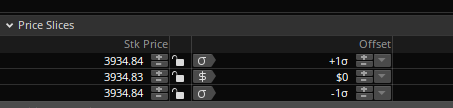
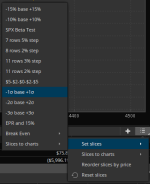
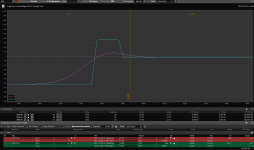
I cannot set price slices to +/-1SD anymore for SPX only. All three slices come to current closing price.
1613180694759.png

1613181328602.png

Even after resetting slices or resetting the whole page to system default, when I choose +/-1SD all slices are the same.
However RUT or few ETFs I tried work fine. The shaded area for +/-1SD is there and varies as I modify the dates.

Anybody able to help please? Thank you.
 
Check what expiration you have set in TOS for SD calculation.
You can set this in a top window - graph bar. Probably you have it set on today's expiration.
 
I see the same on my side.
There is something with TOS because Probability Analysis doesn't work either.
Most likely this is an issue with data for SPX.
If you really need that - set it manually.
 
Same thing here
It also does not work on the the drop down list of futures and currencies

Interestingly the paper trade version works

When I log in just now in the live trade there is a pop up window that comes up with an "unexpected error" but than it continues to load so something is wrong with it
 
An outage is one thing but this is something else Folks can still trade without the sd shading especially if they only trade stocks

I sent TD an email and they said that they are not aware of this problem but they have a notice on the website saying

"Some Information May Be Displayed Incorrectly
Client balances, transaction history, and trade confirmations may not be accurate. We are working to resolve this problem as soon as possible and apologize for any inconvenience."

I will follow up with them with a screenshot so they can start looking into it
 
How did you do it? Via Message Center / Contact us?

I'm very surprised you got such a quick reply from them especially on a Sunday.
 
Yes I used the message center
They usually give a reply on the day before the market opens so I just contacted them today

Unfortunately they did not find a solution for it yet
They suggested to subscribe to Nasdaq Level II quotes and than delete the usergui folder but that did not fix it
Not sure what NASDAQ level II quotes have anything to do with the SD shading on TOS and why does RUT work and SPX does not
This is certainly an oddball one

After looking at some of the symbols in the drop down list some of them are working but it may be a little tricky
I first clicked on the /6A Australian dollar which did not work than the one below /6B which worked and than back to /6A and than it works but other don't work even with that trick

Coincidentally the probability cone is also not working when the SD is not working
 
Looks like they fixed the glitch on their end whatever it was because it's working now

Some of the symbols in the default list ( /CC ) still can find the symbol or maybe it never worked
I wish there was a way to remove all the symbols that I am not using in the default drop down list or at least remove the symbols if it cannot be found
 
I found a way to remove all the useless symbols from the drop down menu on the analyze tab
Probably most folks already know about

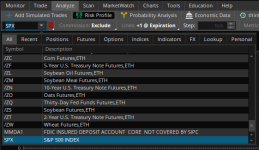
When you click on the drop down you have a bunch of tabs from which you can select
By default the ALL is selected but you can choose RECENT which shows just the symbols you typed in recently
You can also select POSITION which only shows your position there are a few other tabs but that is just going to add to the list
You can also choose from your personal symbol list

I will go with RECENT That will eliminate most of the unused symbols and I don't have to keep scrolling to the bottom to get to my SPX symbol and makes it easier to click from one symbol to the other without having to scroll down every time if the list is small
 
Not sure what you're talking about. If it's this,

1613529132840.png


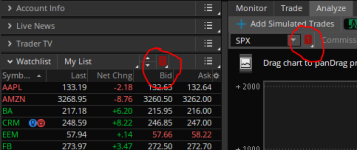
then I have mine set differently. Analyze tab is linked to the Watchlist, so whatever symbol I click upon in the watchlist, it will come to the analyze tab.

1613529304331.png
 
You are close
If you click on the SPX drop down next to the red flag you will see your watch list but also on the top row you will see a bunch of tabs I am guessing if it's linked it's probably set up with the personal tab

I don't have a watch list since I am only trading SPX so I like to keep it simple
 
Yes that is the one

I did not pay any attention to it until now I would just scroll to the bottom to get to SPX I only found out about it when I looked at it closer for a way to remove the useless symbols that don't even work on TOS
 
Top
Contact Us