Alternatives to ONE

Hmm... I am not sure how setting the profit target on the underlying would work
I mean in case of a theta decay the underlying should not have to move in order to make profit
How would I change it to make it based on the credit received ?
Here is an example run where PT is specified as function of credit received:
The ProfitTarget is specified as:
"100 * (leg_pds_short_price * leg_pds_short_qty + leg_pds_long_price * leg_pds_long_qty + leg_pcs_short_price * leg_pcs_short_qty + leg_pcs_long_price * leg_pcs_long_qty)"

The 100 multiplier is required to account for the number of underlyings controlled by one option.
 
I'm interested to hear more about this as well. We all know that ToS needs lots of memory and resources, unless you are running bare bones and not doing much in the way of analytics on the platform. But the Virtual CPU and memory tiers get pricey pretty quickly. I cannot picture a smooth running ONE/ToS setup with less than 16GB of Ram and 4 vCPU's dedicated.

If it's purely for running quotes, IBKR Gateway might be an option to run ONE. That would keep things on the Virtual Machine very light.
 
Here is an example run where PT is specified as function of credit received:
Thanks for the formula Unfortunately this is looks like you have to be a programmer to know how and what to modify in order to get the results so I will leave that to someone else to figure out
At this time I am not looking to learn programing just to do a back test which most likely I will probably not rely on
I am sure someone with programing skills would find it more usefull
 
Hi Tom. I’m interested in trying Amazon workspaces just for ONE and Think Or Swim to feed data to ONE. I want to get a new MacBook so interested to test this out first since ONE doesn’t work with the new Apple chips. Sounds like you’re doing the same. I heard it’s free, but are you finding there is a cost and if so, how much? Also, not quite sure how to set this up. Any help appreciated. Thanks. Amy
Amy - I personally did not find AWS to be easy or intuitive to set up - it was a nightmare and I gave up on it. It was also expensive in my mind at about $60/month. I ended up just buying a cheaper PC and remote desktopping into it from the Mac and it actually works great and is a pretty cheap alternative.

As a side note - IF you run the original version (non-beta version) of ONE, it will in fact run on the new M1/M2 Macs running Windows 11 via Parallels desktop. I have done this too - but I like the features in the "Beta" of seeing multiple windows at a time - which is not in their original version.

If you decide to try this route Amy and need any help - let me know.
 
Last edited:
Amy - I personally did not find AWS to be easy or intuitive to set up - it was a nightmare and I gave up on it. It was also expensive in my mind at about $60/month. I ended up just buying a cheaper PC and remote desktopping into it from the Mac and it actually works great and is a pretty cheap alternative.

As a side note - IF you run the original version (non-beta version) of ONE, it will in fact run on the new M1/M2 Macs running Windows 11 via Parallels desktop. I have done this too - but I like the features in the "Beta" of seeing multiple windows at a time - which is not in their original version.

If you decide to try this route Amy and need any help - let me know.
Thanks Steve. I may try the non beta version for a while and see if I like it. Already overwhelmed with the AWS route, so good to hear its ok to abandon it;-) I have heard of some windows in the cloud services that cost around 30/mo (shadow.tech , ace cloud, etc..) not sure if that's an option that you tried?

Have a happy Thanksgiving!
 
Thanks Steve. I may try the non beta version for a while and see if I like it. Already overwhelmed with the AWS route, so good to hear its ok to abandon it;-) I have heard of some windows in the cloud services that cost around 30/mo (shadow.tech , ace cloud, etc..) not sure if that's an option that you tried?

Have a happy Thanksgiving!
Yes, Amy, I tried 3-4 others as well that were lower priced and could not get any of them to work in what I considered a reasonable way. One of the ongoing challenges I had was that I use a larger monitor and anytime I would try to display a range of positions (P&L Diagrams) on the larger screen, things would crash or not display correctly. When I would contact the service provider, they would tell me I would need to increase the graphics power in my virtual environment and that would often put me back in the $100/month range - so I decided that picking up a used PC laptop with 16 Gb of ram for a few hundred dollars was a much more cost-effective way to go and it just worked a lot smoother. I just keep the PC closed and hidden on the corner of my desk and just log into it from my Mac (a very simple and seamless process by comparison).

If the non-beta version works for you, you would only need to add Parallels and the windows OS to your mac and I think you can buy the Windows OS for about $100 and Parallels is I think around $20/month. If/when you go to set up parallels, they load a free 30-day trial of Windows OS, but after 30 days they will ask you to pay for it.

I hope this helps, but if you want to chat about the different options I have tried and abandoned, let me know.
 
If you are looking at emulating a Windows machine, another thought might be to buy a small box like this for $223 (no affiliation or link credit, just a random pick on Amazon Black Friday sale items). It already includes Win11 Pro. It has 16GB of RAM and 500GB of solid-state hard drive.

Plug it into power, connect to your network, and put it over in the corner somewhere. If you are remoting in from your Mac, you don't need keyboard, mice, and monitor(s), just the single power cord plugged into an outlet. Most newer home routers will let you set up a VPN so that you can log back in while you are away from home, instead of having to carry something else along with you. Of course, it's small enough to carry along with you on travel as well.

Not only does this take the load off of your laptop that you might be using for other work or projects, but also when traveling on limited-bandwidth connections, it makes things so much easier since your data downloads and broker connectivity are happening from home. I run a similar setup and have setup and executed many a trade or made multiple adjustments from very slow airport connections.
 
Thanks for the formula Unfortunately this is looks like you have to be a programmer to know how and what to modify in order to get the results so I will leave that to someone else to figure out
At this time I am not looking to learn programing just to do a back test which most likely I will probably not rely on
I am sure someone with programing skills would find it more usefull
Thanks for your feedback. One update here:
We just released our simple run interface which makes it possible to run simple strategies by defining structures based on their dte, delta.
TakeProfit, StopLoss and Max Days in Trade exits are also exposed.


You can make a try here (we provide 25 free runs now): https://portal.deltaray.io/backtest/run/simple
Link to the announcement blog-post: https://blog.deltaray.io/simple-run
 
If you are looking at emulating a Windows machine, another thought might be to buy a small box like this for $223 (no affiliation or link credit, just a random pick on Amazon Black Friday sale items). It already includes Win11 Pro. It has 16GB of RAM and 500GB of solid-state hard drive.

Plug it into power, connect to your network, and put it over in the corner somewhere. If you are remoting in from your Mac, you don't need keyboard, mice, and monitor(s), just the single power cord plugged into an outlet. Most newer home routers will let you set up a VPN so that you can log back in while you are away from home, instead of having to carry something else along with you. Of course, it's small enough to carry along with you on travel as well.

Not only does this take the load off of your laptop that you might be using for other work or projects, but also when traveling on limited-bandwidth connections, it makes things so much easier since your data downloads and broker connectivity are happening from home. I run a similar setup and have setup and executed many a trade or made multiple adjustments from very slow airport connections.
Dave - this looks like a great alternative - thanks for sharing!
 
We just released our simple run interface which makes it possible to run simple strategies by defining structures based on their dte, delta.
TakeProfit, StopLoss and Max Days in Trade exits are also exposed.
Thanks
That looks a lot better
I tried the Tastyworks strategy and it seems to work very well
 
If you are looking at emulating a Windows machine, another thought might be to buy a small box like this for $223 (no affiliation or link credit, just a random pick on Amazon Black Friday sale items). It already includes Win11 Pro. It has 16GB of RAM and 500GB of solid-state hard drive.

Plug it into power, connect to your network, and put it over in the corner somewhere. If you are remoting in from your Mac, you don't need keyboard, mice, and monitor(s), just the single power cord plugged into an outlet. Most newer home routers will let you set up a VPN so that you can log back in while you are away from home, instead of having to carry something else along with you. Of course, it's small enough to carry along with you on travel as well.

Not only does this take the load off of your laptop that you might be using for other work or projects, but also when traveling on limited-bandwidth connections, it makes things so much easier since your data downloads and broker connectivity are happening from home. I run a similar setup and have setup and executed many a trade or made multiple adjustments from very slow airport connections.
Thanks Dave! Looks like a great alternative.
 
Yes, Amy, I tried 3-4 others as well that were lower priced and could not get any of them to work in what I considered a reasonable way. One of the ongoing challenges I had was that I use a larger monitor and anytime I would try to display a range of positions (P&L Diagrams) on the larger screen, things would crash or not display correctly. When I would contact the service provider, they would tell me I would need to increase the graphics power in my virtual environment and that would often put me back in the $100/month range - so I decided that picking up a used PC laptop with 16 Gb of ram for a few hundred dollars was a much more cost-effective way to go and it just worked a lot smoother. I just keep the PC closed and hidden on the corner of my desk and just log into it from my Mac (a very simple and seamless process by comparison).

If the non-beta version works for you, you would only need to add Parallels and the windows OS to your mac and I think you can buy the Windows OS for about $100 and Parallels is I think around $20/month. If/when you go to set up parallels, they load a free 30-day trial of Windows OS, but after 30 days they will ask you to pay for it.

I hope this helps, but if you want to chat about the different options I have tried and abandoned, let me know.
Thanks Steve. I plan on doing something early next year so I may call on you for some help.
 
Sorry I did not get an alert about any replies to this thread
The Tastyworks strategy I was referring to was selling 16 delta strangles at 45 DTE The only difference is that strategy was for SPY and the one I tried was on SPX and I made the exit at $50 profit instead of the 21 DTE or 50% profit for Tastyworks
I am not planing to do this strategy I just wanted to see how it works as a back test
It uses a lot of margin just to make $50
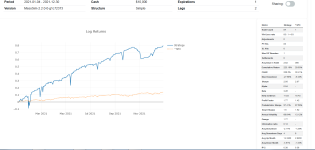
Here is the result


SPX strangle.PNG
 
Hello All - I have been playing with a tool that could largely replace ONE in my world and I was able to negotiate a 30 day FREE trial (no CC or payment info needed) and I did a brief video showing the software as well.

CHECK THIS OUT!

YOU get a 30-day free trial AND get to skip the wait list with this link: https://app.optiontradersassistant.com/ota/register/P-5-L8U-3H9

Here is a Video I put together to briefly show the product as well - https://www.loom.com/share/d18e5b1775db49f2b7baaf6259df59af

Steve
 
Last edited by a moderator:
It has some features that are better than ONE but I would not jump to the conclusion that it could replace ONE but that's just my opinion Also it's a bit more expensive

I assume it has no charting at least I did not see any
I did not see this in the video presentation but can you set up a trade in the past and mange the trade going forward like you can in ONE ?

You said in the video that if you import a trade you would not have the adjustments unless you do them live on the platform
So even if you import the adjutments you would not see it on the platform ?
 
Thanks Steve, interesting features. I didn't see anything related to the T+0 line. How does this model compare to OV, ONE and TOS? Does it allow going out in time or multiple T+0 lines?
 
Thanks Steve, interesting features. I didn't see anything related to the T+0 line. How does this model compare to OV, ONE and TOS? Does it allow going out in time or multiple T+0 lines?
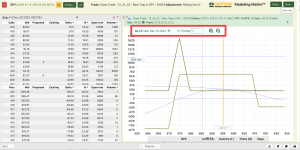
Yes chuck, there are lots of features I did not show, but they are shown in the video and YES, you can go out in time and/or modify IV to see changes in the T0 line as shown in the image below - I don't think it currently has multiple T0 lines, but he is pretty responsive to requests - so we can toss that one at him.


1670862248940.png
 
Top
Contact Us