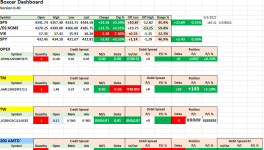
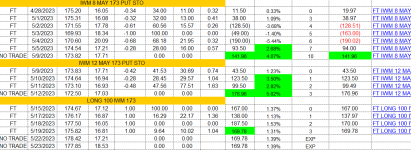
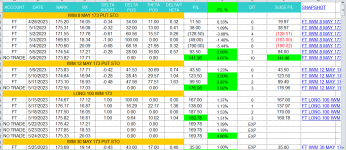
This is a portion of a spreadsheet I created. I export data from TOS. Under the Monitor | Account Statement tab, on the far right side of the Acct Statement row there is a "3 line button". Click on the button and a dialog box appears. The 2nd row from the bottom says "Export to File..." Click that option and a dialog box appears that gives a suggested file name starting with the current date ( 2023-XX-XX-AccountStatement.csv). I will generally accept the suggested option with minor additions to the end of the suggested name (ie - account name). Select the folder that you want to save the file in and select "Save". Open the exported file by double-clicking it (it should open automatically in Excel) and at the top of the csv file will be a line including the account number and name along with the dates included in the file. (you can choose to export up to 370 days at a time)
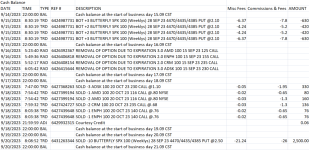
Data exported from TOS:
View attachment 4729
Select the data you want to analyze and use Ctl-C to copy the data. Go to you newly created record file (see below) and paste the data (Ctl-V). You can easily delete rows of data you don't want (days when no trades have occurred). I will manually group (copy and paste) all trades belonging to the same trade sequence. I have manually created the top row shown below. The next 2 rows are copied and pasted from TOS. All data shown on those rows are exactly as supplied by TOS (dates are formatted how I like them). Summing up the fees / commissions / amount in each column for every opening / adjusting / closing trade and then summing those up in the bottom row cell on the far right gives the exact PnL of a completed trade sequence from opening to closure or expiration. I've been using this spreadsheet for years and simply copy and paste to it each time I start a new trade so I don't have to recreate formulas every time I start.
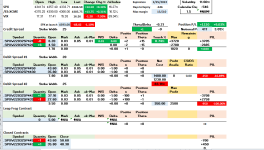
My spreadsheet:
View attachment 4728
You need to be careful to avoid mixing trades / adjustments from different trade sequences / strategies if you're using the same underlying vehicle for different strategies. Also, I try to make sure that any time I open / adjust / close a trade I immediately export the data and copy/paste it into my spreadsheet so I don't have to spend time figuring out how to group various trades.
This procedure may initially sound complicated but once you get into the habit of exporting all trades on the day they are executed it becomes a fairly quick procedure and it gives an exact PnL for every trade you perform. (Note: TOS will occasionally post small credits to you account for trades PnL's that can't be calculated to the exact penny.)

 (If you want to ask - my tool is personalized and not for sharing).